The short version
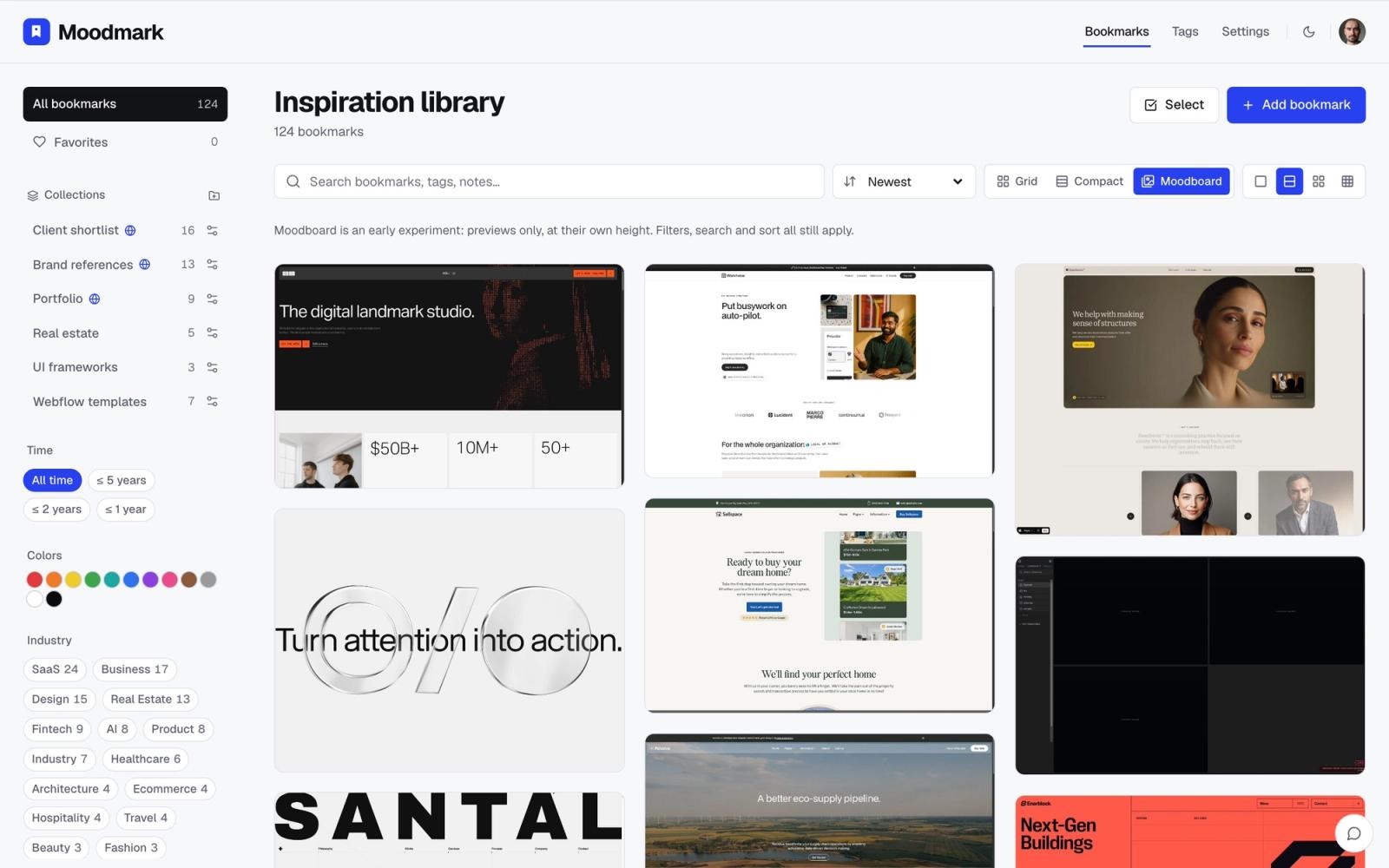
mymind and Moodmark solve a similar surface-level problem: you see something good online and you want it saved somewhere you'll actually find it again. Past that, they're built for different jobs. mymind is a personal "second brain" for everything you want to remember: articles, recipes, tweets, products, quotes, design inspiration, all of it. Moodmark only does one thing, saving design references, and does more with each one: it pulls the color palette, fonts, and tech stack out of the page itself, so your library becomes something you can filter visually instead of a list you scroll through.
If your saved tab is a mix of everything in your life, mymind's breadth is the point. If what you save is almost entirely websites, portfolios, and product UI you're referencing for client work, Moodmark's narrower focus does more for the way designers actually work: matching a mood, a color, or a vibe rather than remembering a title.
How each one captures a reference
mymind's browser extension and share-sheet integration let you save almost anything with one click or keystroke, then its AI auto-categorizes and tags it in the background: articles become reading-list items, products become shopping references, images become visual notes. It's genuinely fast and the auto-tagging is well built for general content.
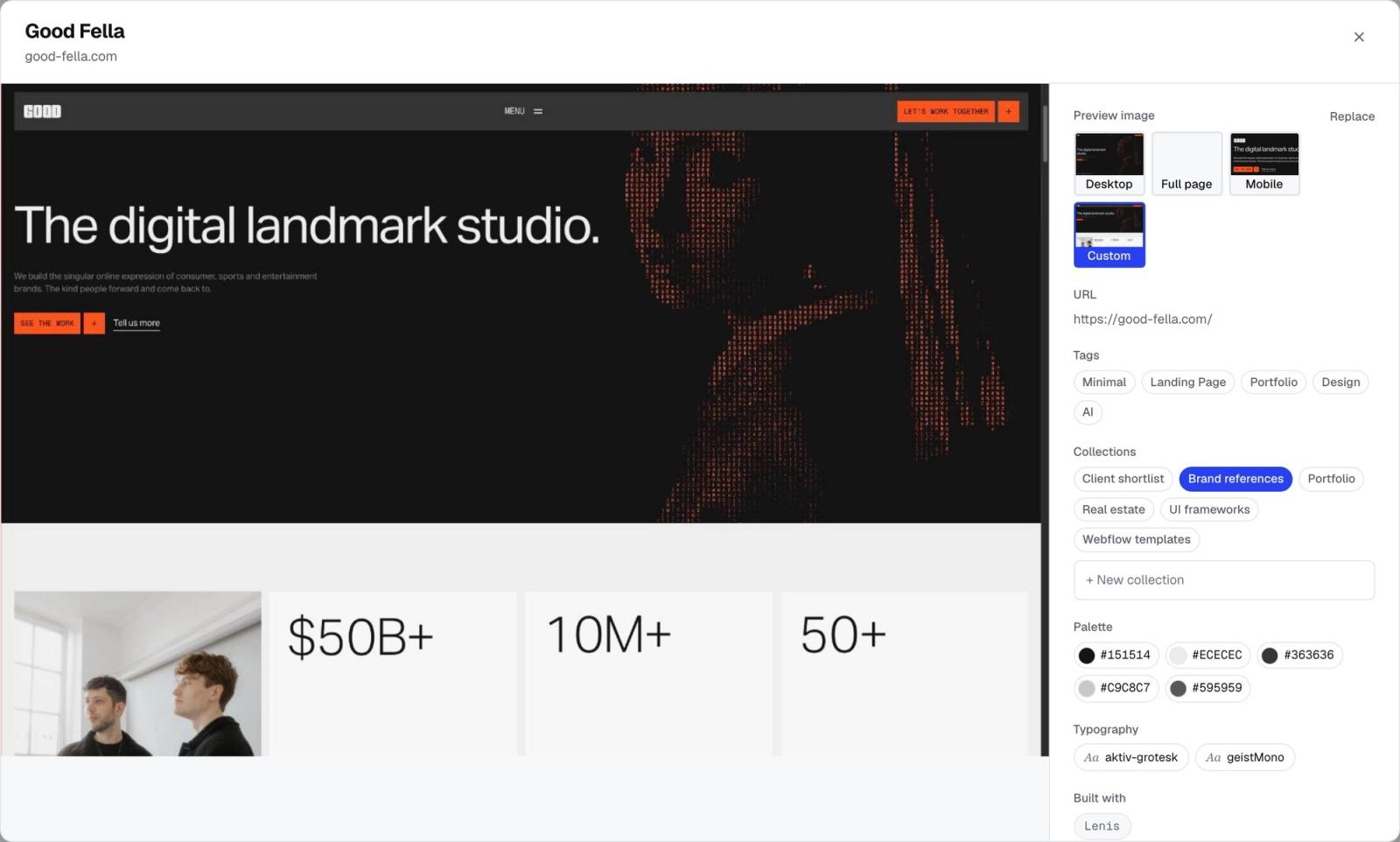
Moodmark's Chrome extension does one capture, but it's a deeper one. Saving a site stores a full screenshot, extracts the live color palette (not a guess from the thumbnail), reads the fonts actually in use, and flags the tech stack (React, Webflow, Shopify, and so on). None of that is manual tagging you add later; it's pulled from the page at save time, so a library of fifty sites already has fifty structured records behind it, not fifty untagged screenshots.
Finding things again: search vs filter
This is where the two tools diverge the most. mymind's whole pitch is that you don't need to organize, because its search and AI tagging will surface the right card when you need it. That works well when you remember roughly what you saved, a title, a keyword, a rough topic.
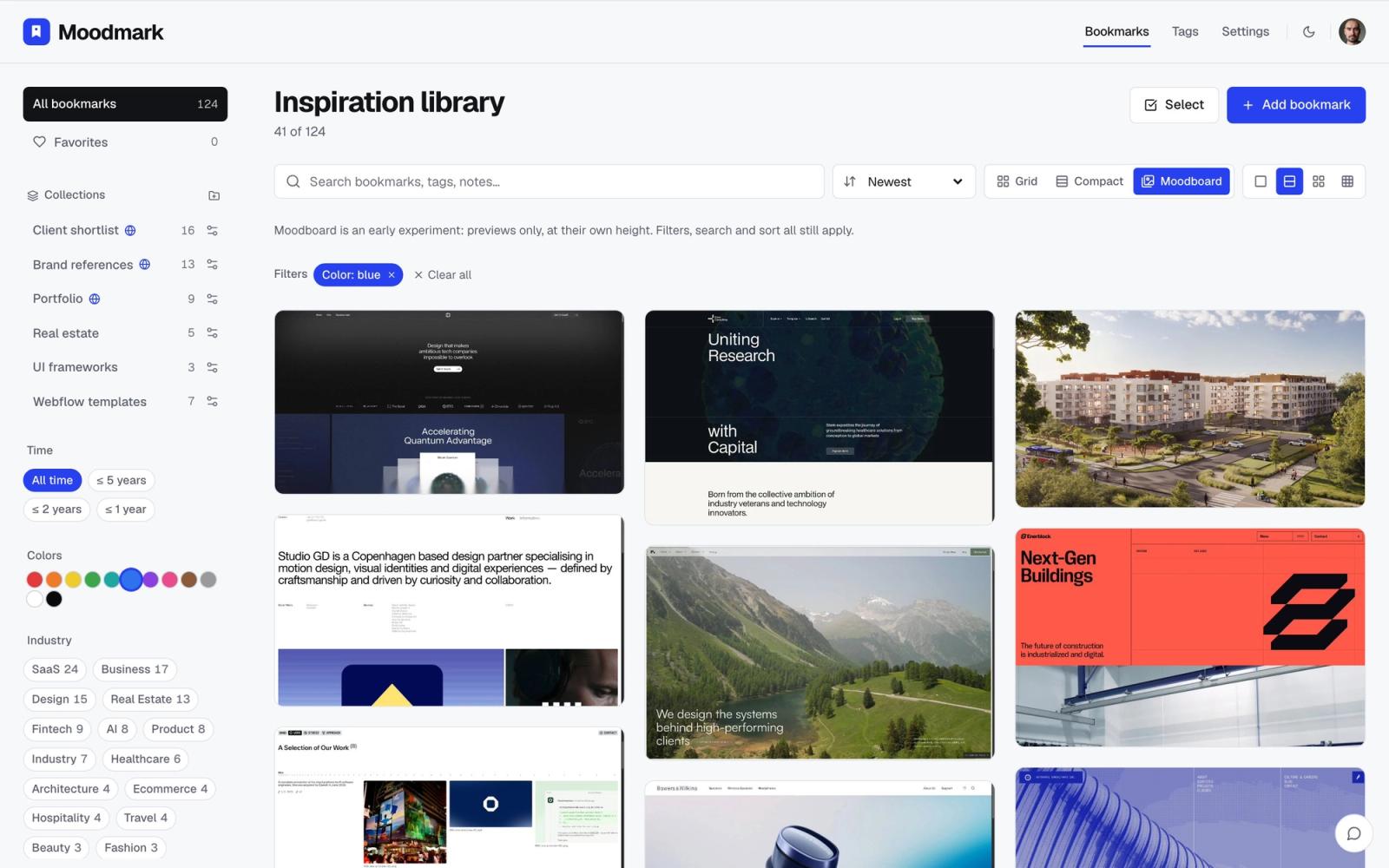
Design references don't usually work that way. You rarely remember a portfolio by its name; you remember "that warm beige site with the serif headline" or "the SaaS landing page that was all dark mode and lime green." Moodmark's library is built around that: click a color swatch and the library narrows to only the sites using that color, click a style tag and it narrows to that aesthetic. There's no search box to guess the right words for; you filter by the actual visual property you remember.
Keeping a growing library usable
mymind leans entirely on AI auto-tagging plus search to keep a library navigable as it grows. For a few hundred mixed items that's enough, since you're mostly retrieving things by remembering what they were about. It starts to strain once the library is thousands of items deep and a large chunk of them are visually similar, which is exactly the shape a designer's saved-sites pile takes after a year of client work: dozens of SaaS landing pages, dozens of portfolios, all plausibly matching the same vague search term.
Moodmark handles the same growth differently. Collections group references by project or client the way folders would, but filtering by color, style, fonts, or tech stack works inside a collection or across your whole library at once, so you're never stuck choosing between "organized into the right folder" and "filterable by how it looks." A library of 2,000 saved sites filters down to the eleven with a specific shade of forest green just as fast as a library of twenty does, because the palette was extracted and indexed at save time rather than inferred later from a search query.
Working with clients and teams
mymind is built as a personal tool; there's no real concept of sharing a curated set of saves with someone else for feedback. If you want a client to see your reference pull, you're exporting or screenshotting out of mymind into something else.
Moodmark's public boards solve that directly: turn a collection into a shareable link, and clients can look through it and vote on which references they respond to, right from the board, with no account needed on their end and no extra tool in the loop. For an agency juggling several clients at once, that one feature often matters more day-to-day than the filtering does, because it removes an entire round trip of screenshotting references into a deck.
The AI feature mymind doesn't have
Neither tool stops at saving. mymind's AI goes to work on categorization and recall: it writes summaries, suggests tags, and helps you ask natural-language questions about what you've saved. It's a real advantage for a tool meant to hold everything about your life, not just design work.
Moodmark's AI is pointed at a narrower, more concrete output: take any saved reference and turn it into a design.md, a paste-ready prompt plus the actual color and font tokens pulled from that site, built to drop straight into an AI app builder like v0, Cursor, Lovable, or Bolt. mymind has nothing equivalent, because it isn't trying to be a starting point for building something; it's trying to be a memory of everything. If you ever go from "I like how this site looks" to "build me something like this," that's a step mymind simply doesn't take.
Where mymind still wins
- Saving non-visual content: articles, tweets, quotes, recipes, anything that isn't a website you're referencing for design
- A single inbox for your entire digital life, not just client work
- Mature mobile capture via share sheet, useful for saving on the go across apps
Where Moodmark wins for design work
- Filtering by color, style and industry instead of keyword search
- Automatic palette, font and tech-stack extraction on every save
- Public, shareable boards with client voting, so you can send a curated set of references to a client and see what they react to without a separate tool
- Turning a saved reference into a design.md, a paste-ready prompt and token set for AI builders like v0, Cursor, Lovable or Bolt, when you want to start building from it
Pricing
mymind is a paid product from day one, with a free trial and no meaningful free tier for ongoing use. Moodmark has a genuinely usable free plan: up to 50 bookmarks with the full visual library, filtering, extension capture, collections, public boards and client voting included at no cost. Premium is $5/month or $48/year for unlimited bookmarks plus the design.md export, aimed at anyone who outgrows 50 saved references or wants to generate build prompts from them.
Which one should you actually use
If you're a designer, an agency, or a vibecoder whose saved tab is mostly websites, portfolios, and UI you're referencing for a project, Moodmark is the better fit: it was built around the specific habit of collecting visual references and finding them by how they look. If what you save spans your whole life, not just design work, and you want one inbox for everything, mymind's breadth makes more sense, though you'll likely still end up wanting something more visual for the design-specific slice of what you save.
Some people run both: mymind as the everything-inbox, Moodmark as the dedicated design reference library that filters by color and style. They're not really competing for the same save, since the design-reference use case is specific enough that a general tool and a visual-first one can comfortably coexist.
Questions & answers
Is mymind good for saving design inspiration?
It can store screenshots and links of anything, including design references, but it doesn't extract color palettes, fonts or tech stack from the pages you save, and you can't filter your saved items by visual properties like color or style the way you can in a tool built specifically for design references.
Does Moodmark replace mymind?
Only for the design-reference slice of what you save. Moodmark doesn't handle articles, recipes, tweets or general reading-list content the way mymind does; it's focused on websites and visual references for design work.
Is there a free alternative to mymind for designers?
Moodmark's free plan covers up to 50 bookmarks with the full visual library, color and style filtering, the Chrome extension, collections and public shareable boards with client voting, all at no cost.
