
Two different ideas of what a mood board is
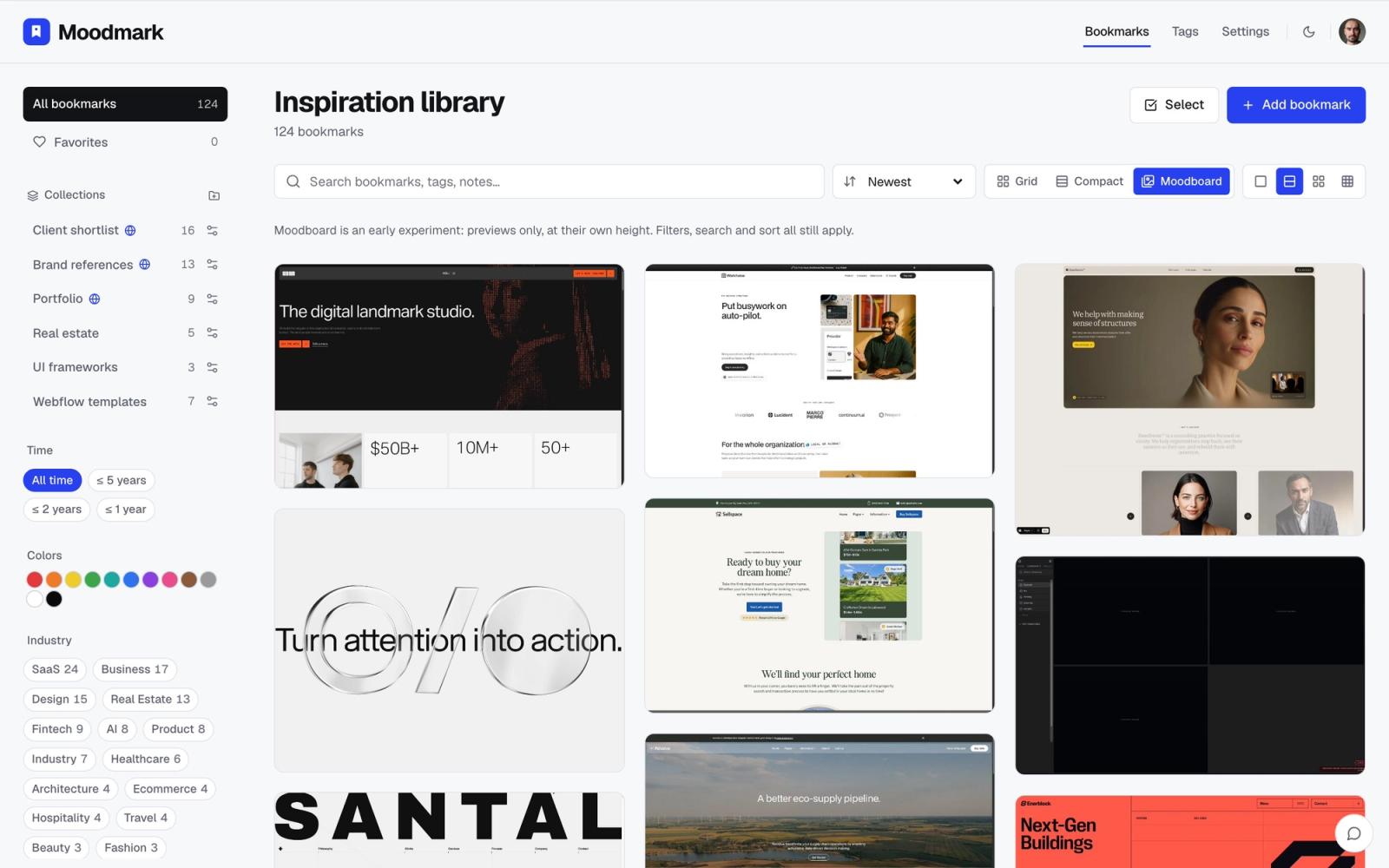
Milanote and Moodmark both get filed under "mood board tools," but they start from opposite assumptions about what a mood board actually is. Milanote treats it as something you build: a blank canvas where you drag in images, notes, and links, then arrange them by hand into a layout that tells a story. Moodmark treats a mood board as something that already exists the moment you start saving references, a library you query by filtering, not a canvas you compose.
Neither approach is wrong, but they suit different moments in a designer's workflow, and the gap between them shows up fast once you're actually using either tool day to day.
What Milanote does well
Milanote is a genuinely good tool for presenting a story. It gives you a free-form board where notes, images, to-do lists, and links can be dragged next to each other, connected with lines, and grouped into columns, closer to a digital corkboard than a database. For a creative brief, a client kickoff deck, or a project plan you want to walk someone through visually, that flexibility is the whole appeal.
- A free-form canvas for arranging notes, images, and links together
- Templates for briefs, storyboards, and project plans
- Good for presenting a narrative, since you control exactly where everything sits
The tradeoff is that every board is a manual layout job. Nothing organizes itself. If you save fifty references over a few months, Milanote doesn't know that twelve of them share a warm, muted palette or that eight are fintech dashboards, because it has no concept of what's inside the images you dropped in. Finding anything again means remembering which board you filed it on, then scrolling that board's canvas.
Where Moodmark starts differently
1. The library organizes itself
Moodmark doesn't ask you to lay anything out. Every saved reference lands in one library, and the organizing happens automatically at capture time: the screenshot, the color palette read straight off the page, the fonts in use, and an industry tag are all extracted without you touching a canvas. There's no board to design and no layout to keep tidy as it grows.
2. Capture takes one click, not building
Saving a site in Milanote usually means dragging in a screenshot or pasting a link as a card, then deciding where it goes. Moodmark is a Chrome extension: you click it on any live site, and it captures a full-page screenshot, a mobile view, the palette, and the fonts in about a second. There's no board open, nothing to place, you're straight back to browsing.
3. Filtering replaces arranging
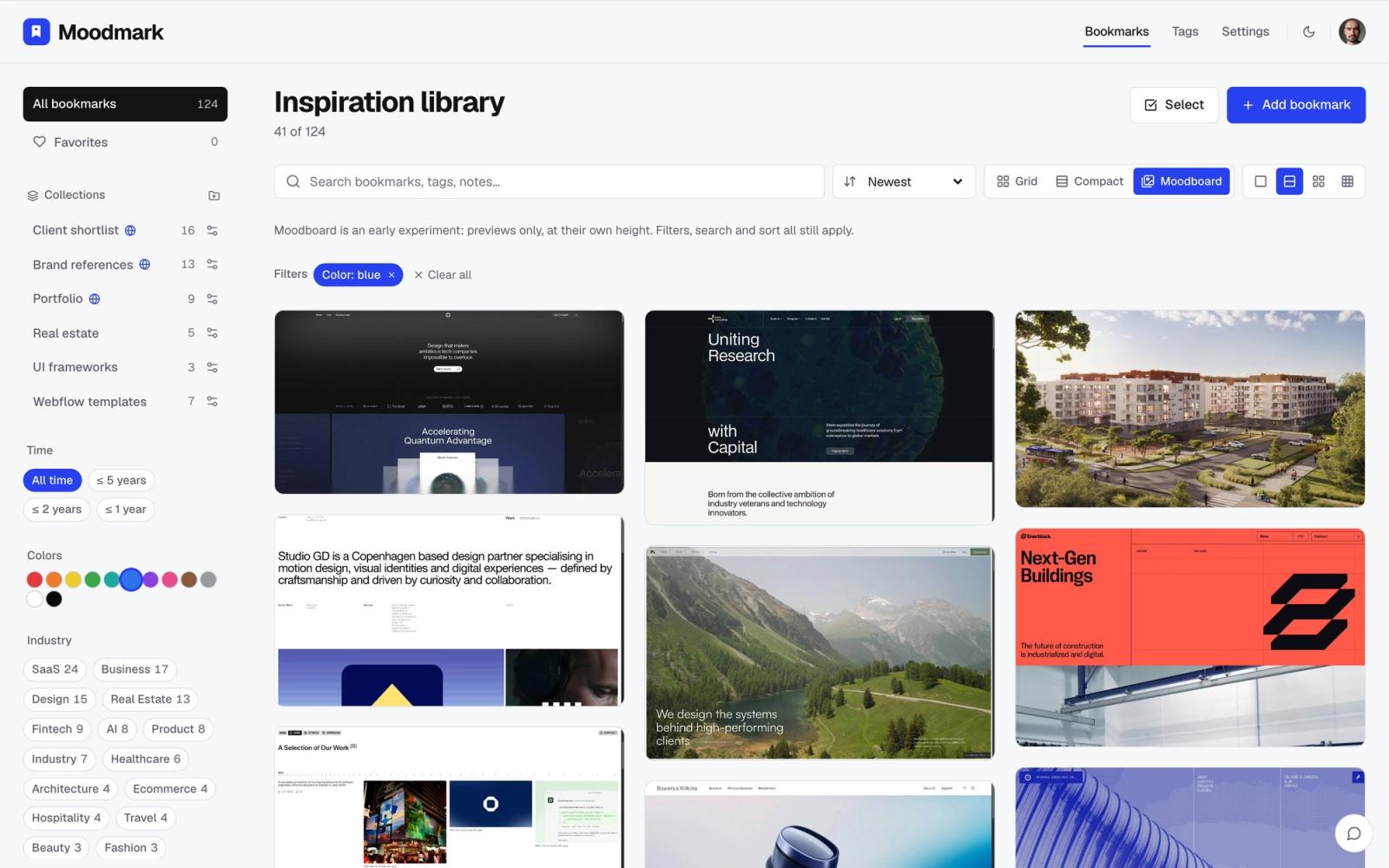
This is the real divide. In Milanote, finding a reference means remembering which board it's on and scanning the canvas. In Moodmark, you filter the whole library by color, style, or industry, and the wall of previews rearranges itself around whatever you clicked. You don't remember a reference by the board you filed it on, you remember "that warm beige portfolio," and that's exactly what you search by.
4. Sharing a board with a client
Milanote boards can be shared and commented on, which works well for a project walkthrough where you're guiding someone through a fixed layout. Moodmark boards are built for shortlisting instead: a public link where a client can vote directly on the references they prefer, so a round of feedback turns into a handful of clicks instead of a call talking someone through a canvas.
5. Turning a reference into an AI build prompt
Milanote has no equivalent here at all. Because Moodmark already extracts palette and font data the moment a site is saved, it can turn any reference into a design.md, a paste-ready prompt with real CSS and Tailwind design tokens for AI builders like v0, Cursor, Lovable, or Bolt. A Milanote board can inspire the work; a Moodmark reference can feed a color value straight into the code.
6. What a real research session looks like
Say you're collecting twenty sites for a fintech pitch and want a similar cool, restrained palette. In Milanote, each one means a screenshot or a pasted link, then dragging it into position on the right board before it's part of anything searchable. In Moodmark, it's one click per site from the tab you're already on, and by the time you've closed the twentieth tab, the whole set is already filterable by color without any manual sorting.
- Full-page screenshot plus a mobile view, captured automatically
- Color palette read directly from the live page, not eyeballed later
- Fonts and tech stack detected without opening dev tools
- An industry tag added at capture time, with no manual sorting
7. What happens once the collection grows past a handful of boards
A Milanote board stays easy to scan while it holds a dozen or two carefully placed items, which is exactly the scale it was designed for. The strain shows up later, once you've made ten boards across ten projects and are trying to remember which one had that reference with the split-screen hero. Nothing links the boards by what's actually on them, so cross-project searching means opening each one and looking. Moodmark doesn't have this ceiling because there's only ever one library, not a growing stack of separate canvases, and a filter runs across everything you've ever saved regardless of when or why you saved it.
That's also why the two tools tend to get reached for at different moments. A designer opens Milanote when a specific deliverable needs a layout: a brief for a client, a plan for a launch. A designer opens Moodmark constantly, in the background of ordinary browsing, because saving a reference costs one click and never needs a decision about where it goes.
So which one should you use
If your job is presenting a story, a creative brief, a project plan, a client kickoff deck where you control exactly how everything sits on the page, Milanote's canvas genuinely fits that better than a filterable library would. It's built for telling, not for retrieval.
If what you're actually doing is collecting design references as you browse and needing to find one again months later by how it looked rather than which board you filed it on, Moodmark is built around exactly that loop. One click to save from the browser, a library that tags itself, filtering by color and style instead of scrolling a canvas, and the option to turn any saved reference into an AI build prompt when you're ready to build.
Some designers end up using both: Milanote for presenting a finished narrative to a client or team, Moodmark for the ongoing, unglamorous job of collecting and finding references in the first place. They're solving different problems, arranging versus retrieving, which is exactly why the comparison keeps coming up.
Questions & answers
Is Milanote a good alternative to Moodmark?
For presenting a story or a project plan on a free-form canvas, yes. For capturing live websites in one click and finding them again by color or style without manual arranging, Moodmark is built specifically for that, which Milanote isn't.
Does Milanote extract colors and fonts automatically?
No. Milanote stores whatever image or link you drag in without reading its contents. Moodmark's browser extension reads the color palette and fonts directly off the live page the moment you save it.
Can I filter a Milanote board by color the way I can in Moodmark?
Milanote boards are organized by manual layout, not by searchable attributes, so there's no color or style filter. Moodmark's library is built to filter by color, style, and industry across everything you've saved.
