Why Pinterest falls short for web design work
Pinterest is genuinely good at what it was built for: a feed of images pulled from all over the internet, ranked by an algorithm that guesses what you'll like next. That's a great fit for moodboards, recipes, and home decor. It's a poor fit for the way designers actually collect references.
The problems show up as soon as you try to use it for real design work.
- A pin is a static image crop, not the live page. You lose the layout, the interactions, and any sense of how the site actually behaves.
- There's no color palette, font data, or tech stack attached to a pin. If you want to know what a site's exact background hex or typeface is, you're back to opening dev tools by hand.
- The feed reshuffles your own saves. Boards get buried under recommended pins, and finding something you saved three weeks ago means scrolling, not searching.
- There's no path from a pin into a build. You can't hand a client-facing tool or an AI builder anything more than a screenshot you found on Pinterest, often stripped of its source link entirely.
None of this is a knock on Pinterest doing its job badly. It's just not a design-reference tool, and the gap gets more obvious the more seriously you take reference-gathering as part of your process.
What a design reference tool actually needs to do
Before comparing tools, it helps to be specific about what "good for web design" actually means. A reference manager built for this work should:
- Capture the real page, not a scraped thumbnail: a full screenshot at minimum, ideally full-page and mobile views too.
- Pull out the design's underlying data automatically: color palette, fonts, and where possible the tech stack.
- Let you find things again by how they look, not just by what you titled them or which folder you dropped them in.
- Support sharing a curated set with a client or teammate without exporting to a deck.
- Give you a way to move from "I like this reference" to actually building something, if that's the next step.
Measured against that list, most general-purpose inspiration apps fall short in at least two or three places. Here's how the realistic alternatives stack up.
The best Pinterest alternatives for web designers
Moodmark
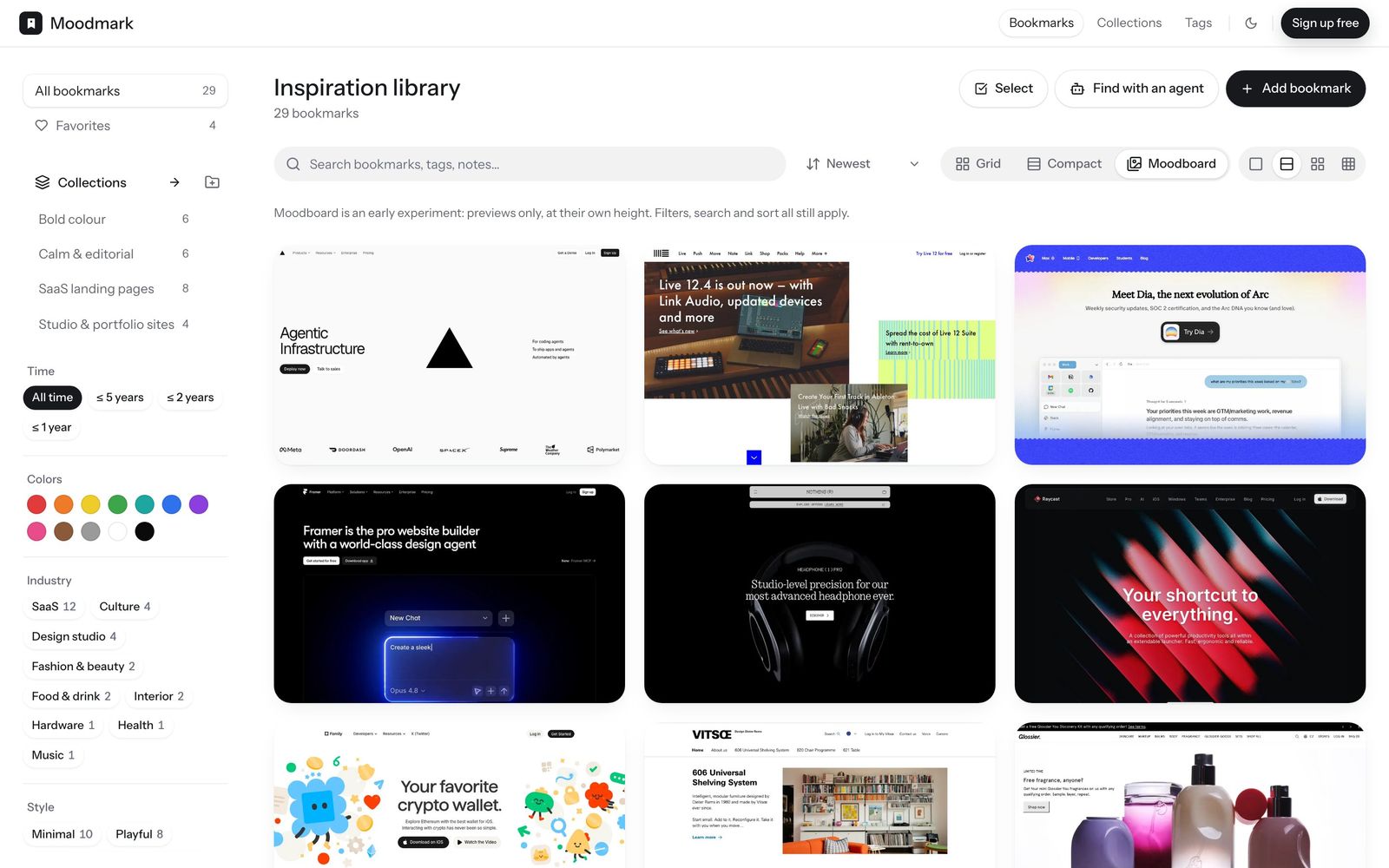
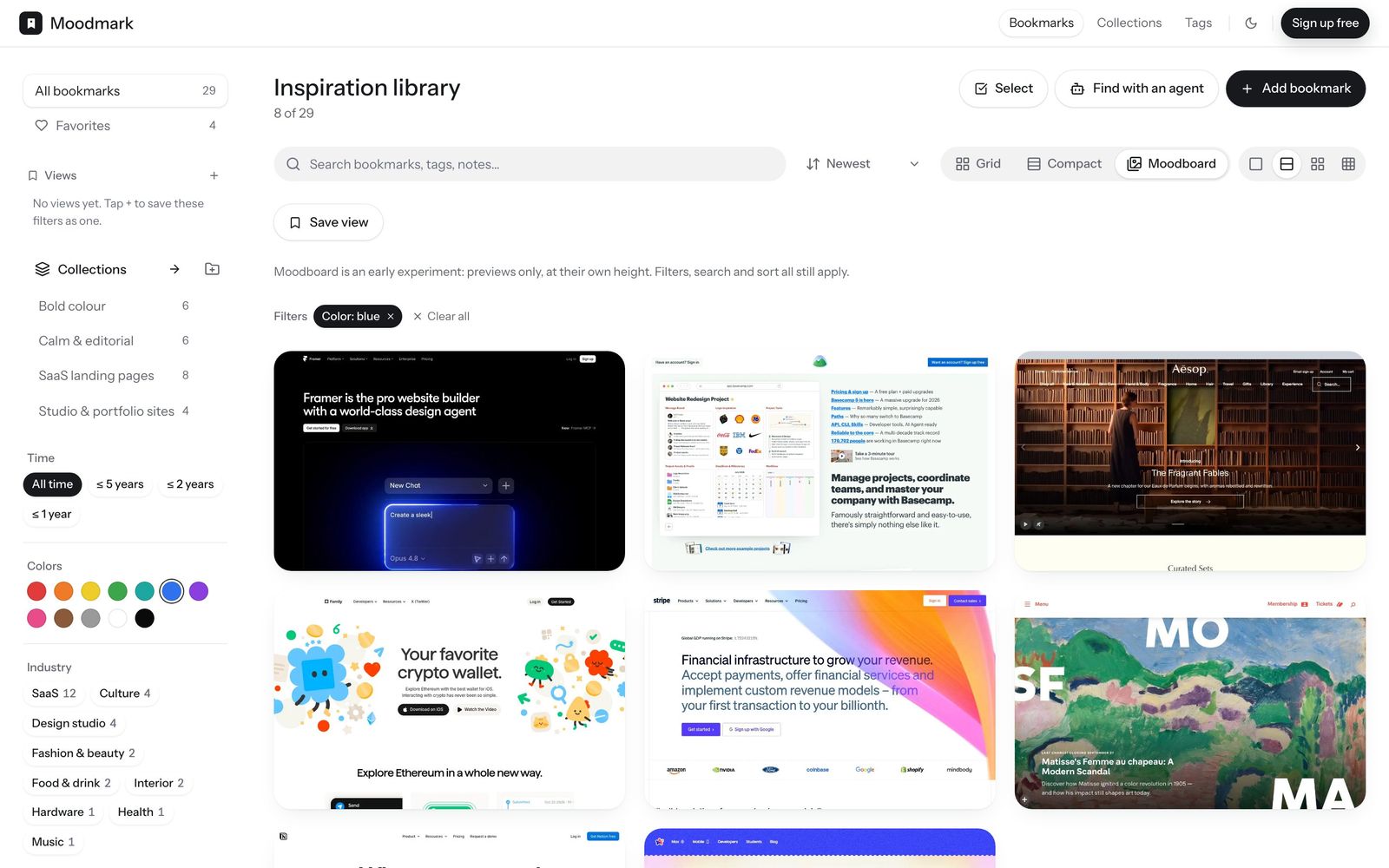
Moodmark is a visual bookmark manager built specifically around saving websites for their design. A one-click Chrome extension captures the page as a screenshot and automatically reads out its color palette, fonts, and tech stack, tagging the save along the way. The point of doing that capture is what happens next: instead of scrolling a chronological list, you filter your whole library by color, style, or industry, so "that warm beige portfolio site" becomes something you can actually search for instead of something you scroll for.
Collections can be made public, which is useful for agencies sharing a client-ready board instead of a screen-share, and public boards support voting so a review starts from a shortlist rather than a blank call. Moodmark also has one capability nothing else on this list has: it can turn any saved reference into a design.md, a paste-ready prompt plus CSS and Tailwind design tokens for AI builders like v0, Cursor, Lovable, or Bolt. It's a genuine bonus on top of the filtering, not the main pitch, but worth knowing about if you build with AI.
Best fit: designers and agencies who save sites specifically for their visual design and want to find them again by look, plus anyone feeding references into an AI builder.
Eagle
Eagle is a paid desktop app for organizing local image and asset libraries. It's popular with designers who already have a large folder of screenshots, UI kit exports, and reference images and want a fast, tag-driven way to browse them offline. It doesn't capture live web pages the way a browser extension does, so you're generally still taking your own screenshots or downloading images manually before Eagle can organize them.
Best fit: designers who want a powerful local library for assets they've already collected, rather than a tool to capture new web references as they browse.
Savee
Savee (formerly Savee.it) is closer to Pinterest in spirit but with a visual style and userbase skewed toward designers and creatives. The feed and discovery angle are still there, so it's good for browsing curated inspiration from other designers, but it has the same core limitation as Pinterest for your own saves: no palette or font extraction, and no way to filter your library by the specifics of a design rather than a tag you typed in.
Best fit: designers who want a Pinterest-like discovery feed with better visual taste, used alongside a separate tool for organizing their own project references.
Are.na
Are.na is a research and connections tool built around loosely linked "blocks" and "channels" rather than a feed. It's less about finding a website again by its look and more about building open-ended, associative research boards, mixing images, links, and text freely. Designers doing early-stage concept research often like it precisely because it resists the algorithmic feed model. It's not built to extract design data from a saved site, so it works best as a thinking tool rather than a searchable reference library.
Best fit: early research and moodboarding where the connections between references matter as much as the references themselves.
Raindrop
Raindrop is a strong general-purpose bookmark manager with solid tagging, folders, and full-text search, and it's a common landing spot for designers leaving Pinterest. The trade-off is that it's built for saving links across every topic in your life, not specifically for design work, so it captures a link and a preview thumbnail rather than a full screenshot, palette, and font read.
Best fit: one tool for all your bookmarks, if you don't need design-specific capture or visual filtering.
How to choose based on your workflow
- Solo designer collecting references as you browse: Moodmark, for one-click capture plus filtering by look.
- Agency sharing shortlists with clients: Moodmark's public boards with voting, so review starts from a curated set.
- Vibecoder or AI builder turning references into working sites: Moodmark's design.md, since it's the only option here with a direct path from reference to build prompt.
- Designer with a large existing local asset library: Eagle, for fast offline browsing of files you already have.
- Open-ended concept research: Are.na, for connecting references associatively rather than tagging them individually.
- General bookmarking across every part of your life, design included: Raindrop.
The bottom line
Pinterest is fine for a mood board of textures and colors you'll never look at again in six months. It's the wrong tool once reference-gathering becomes part of how you actually work: you need the real page captured, its palette and fonts pulled out automatically, and a way to find it again by how it looks rather than by scrolling. Try a couple of the options above against your own workflow before committing to one. If you save sites specifically for their design and want to search them by color and style, or eventually turn one into an AI build prompt, that's exactly the gap Moodmark is built to fill.
Questions & answers
Is there a Pinterest alternative made specifically for web designers?
Yes. Moodmark is built around saving and organizing website references specifically, capturing each site's screenshot, color palette, fonts, and tech stack, and letting you filter your library by how a site looks rather than by tags or folders.
Can I still browse inspiration feeds like Pinterest with these tools?
Savee offers a similar curated discovery feed with a more design-forward userbase. Moodmark, Eagle, and Are.na are built around your own saved library rather than an algorithmic feed, so they suit gathering and organizing references you've already found.
Do any of these tools help turn a design reference into an actual build?
Moodmark is the only one with a direct path from reference to build: it can generate a design.md from any saved site, a paste-ready prompt plus CSS and Tailwind tokens for AI builders like v0, Cursor, Lovable, or Bolt.
