
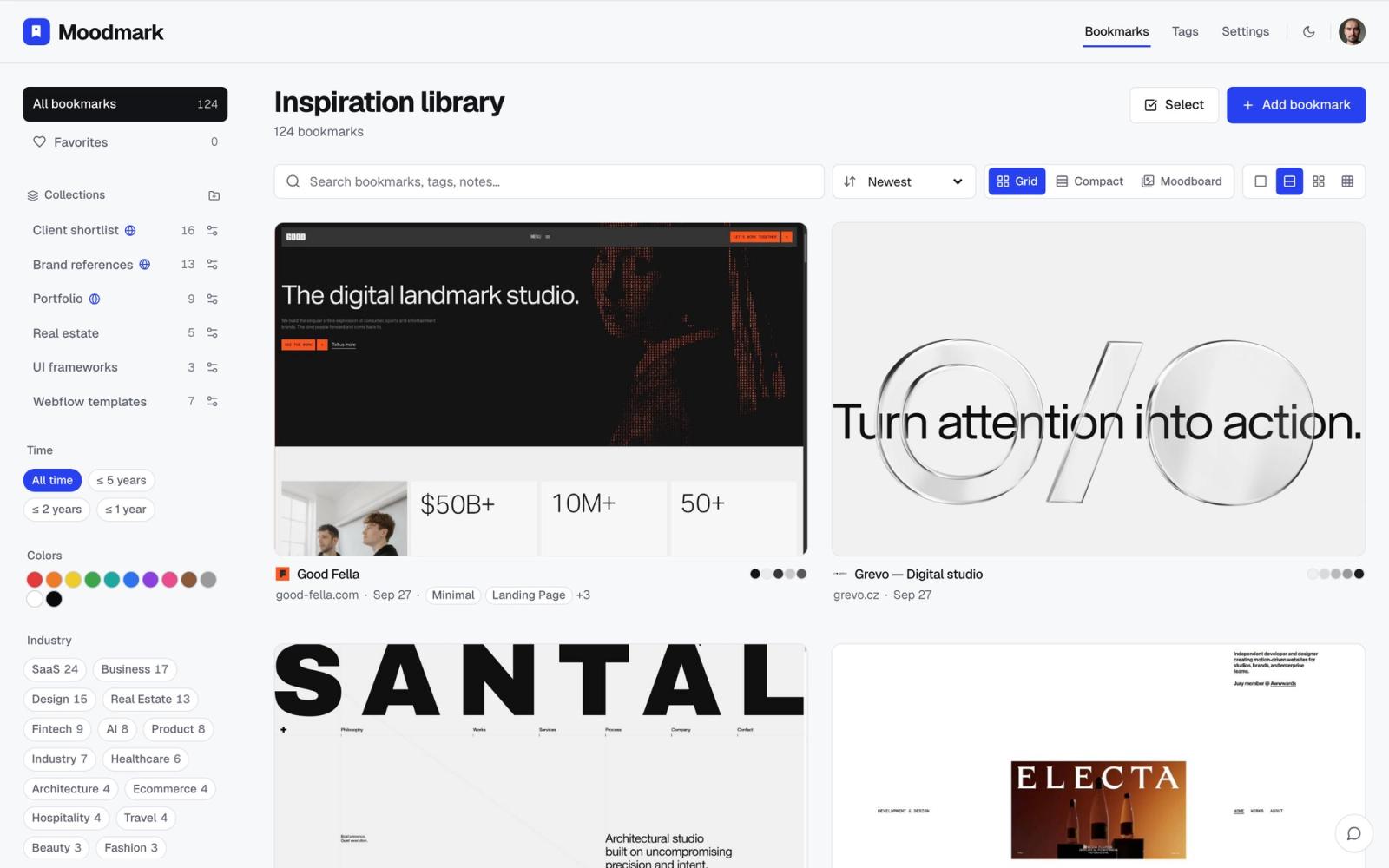
A lot of designers already have a "design inspiration" database in Notion. It usually starts the same way: you paste a link, add a cover image if you remember, type a couple of tags like "dark mode" or "e-commerce," and move on. Six months later the database has ninety rows, half of them with broken previews, and finding the one reference you actually want means scrolling and squinting at tiny thumbnails. Notion is not a bad tool. It is just not a tool built for this specific job.
Where Notion genuinely works
It is worth saying plainly what Notion gets right, because a lot of teams use it successfully.
- It is already open all day, so adding a link takes no extra app switch
- Databases are fully customizable: you can add any property, any view, any relation to other pages
- It is shared with the rest of the team by default, since project docs, briefs, and specs already live there
- Gallery view gives you a grid of cover images, which looks like a mood board at a glance
If your team is small, your reference collection is under fifty items, and everyone is disciplined about filling in properties, a Notion database can hold up fine. The cracks show up as the collection grows and the tagging becomes inconsistent, which is nearly always what happens.
Where it breaks down
Nothing is captured automatically
Notion does not know what a website looks like. When you paste a URL, you get a link preview at best, usually just the page title and maybe a favicon. To actually see the design later, you have to take your own screenshot, upload it, and set it as the cover. Do that for the first ten references and it feels manageable. Do it for the two-hundredth and it is the reason the database stops getting updated.
Every property is something you typed
A Notion database is only as useful as its properties, and properties are manual. If you want to filter by color, you need a "primary color" text field that you fill in by eye, from memory, guessing at a hex code or picking the closest named color from a dropdown you built yourself. Nobody keeps this up past the first week. The result is a database where "style" and "vibe" tags drift into whatever word felt right that day, so filtering by them later returns almost nothing useful.
You cannot search by how something looks
This is the core gap. Design references are not remembered by title or category, they are remembered visually: "that warm beige portfolio site" or "the one with the big serif type and the green accent." Notion's filters work on text and select properties, so unless you already predicted and typed the exact tag you will search for later, there is no way to ask "show me the warm, earthy ones" or "show me everything with a similar palette to this site." You are stuck scrolling a gallery view and eyeballing tiny cover thumbnails, which is exactly the folder-scrolling problem people turn to a database to avoid.
No sense of what a site is actually built with
If you are gathering references to hand to a developer or feed into an AI builder, you need more than a screenshot. Fonts, spacing, and the rough tech stack (is this Webflow, Framer, a custom React build) all matter for how buildable a reference is. Notion has no concept of any of this unless a person manually inspects the page and writes it down, which almost never happens in practice.
How Moodmark handles the same job
Moodmark is built around a single idea: a design reference is a visual object, not a row of text, so the tool should capture and search it that way.
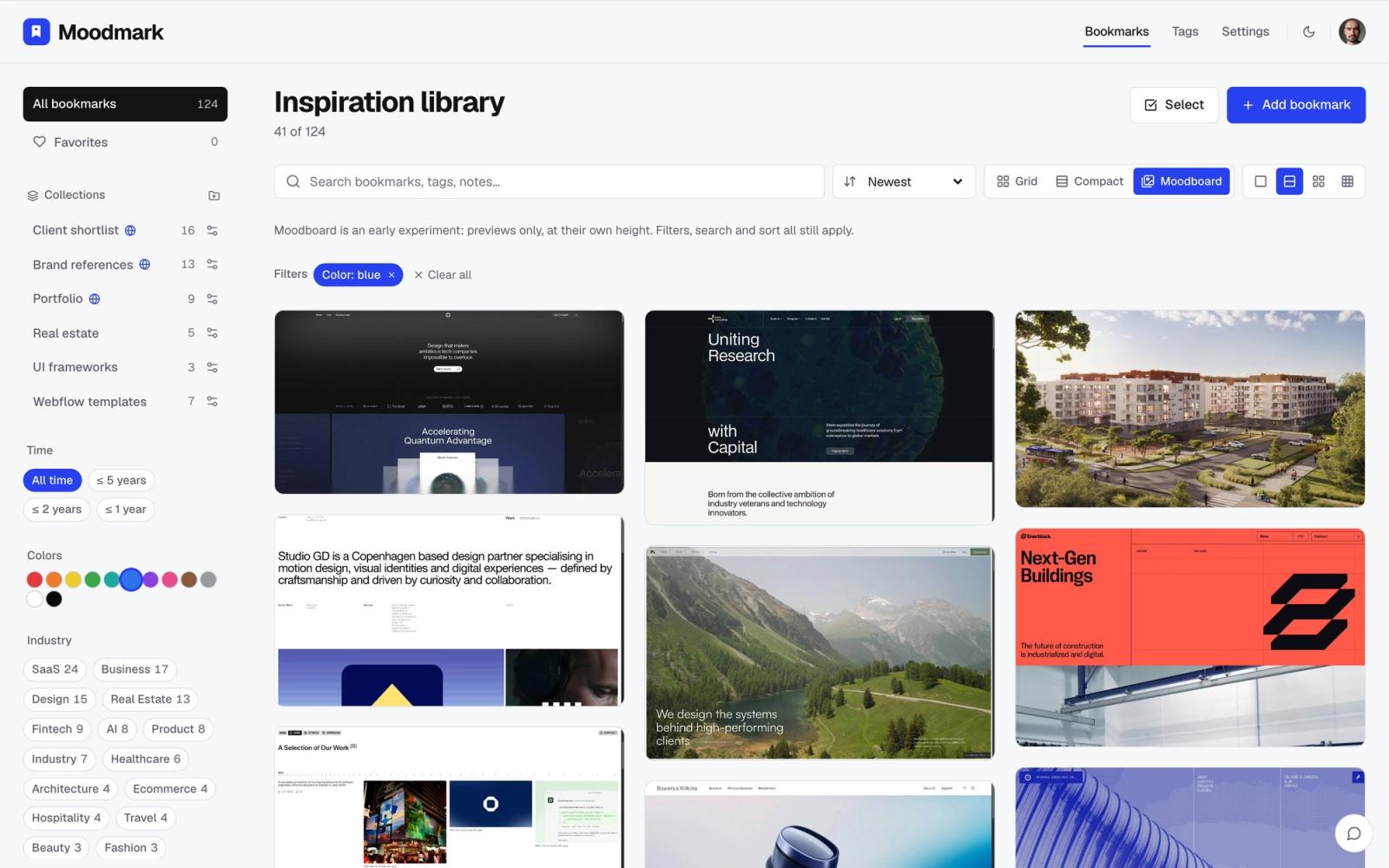
- One click in the Chrome extension saves the site with an actual screenshot, not a thumbnail you have to upload yourself
- The color palette is extracted automatically from the page, so every saved site is already searchable by color without you typing a hex code
- Fonts and a rough sense of the tech stack are pulled in at save time, so a reference already carries the detail a developer or AI builder would want
- AI tags describe the style and industry on their own, instead of relying on you to remember to fill in a property
- Filtering happens by clicking a color swatch, a style, or an industry, not by remembering what you typed into a select field eight months ago
The practical difference shows up the moment your library passes fifty or so saved sites. In Notion, that is roughly when tagging discipline slips and gallery view stops being fast enough. In Moodmark, the palette and style data were captured automatically at save time, so filtering by "warm, muted tones" or "SaaS landing pages" works the same on day one hundred as it did on day one.
The AI build prompt, as a bonus
One thing Moodmark can do that a Notion database has no path to: turn a saved reference into a design.md file, a paste-ready prompt with the extracted colors and fonts as design tokens, ready to hand to v0, Cursor, Lovable, or Bolt. It is a genuinely useful shortcut when you have found the look you want and need to start building fast, but it is a bonus on top of the visual library, not the reason to switch. The reason to switch is that filtering by how a site looks is something a text-based database cannot do at all, no matter how carefully you set up the properties.
Which one to pick
If your inspiration collection is small, mostly shared internally, and lives alongside project docs you already keep in Notion, there is no urgent reason to move it. But if you are a designer or agency saving references regularly, and you keep losing ten minutes hunting for a site you know you saved somewhere, the fix is not a better tagging system. It is a tool that captures the visual details automatically so you never have to tag them by hand in the first place.
Questions & answers
Can I use Notion for a design inspiration database?
Yes, and it works fine for small collections where you are willing to manually screenshot and tag each site. It becomes hard to maintain once the collection grows past around fifty references, because every property has to be filled in by hand.
Does Notion support filtering by color or visual style?
No. Notion filters work on text, select, and date properties that you create and fill in yourself. There is no way to search by how a saved site actually looks unless you have already typed a matching tag for it.
What does Moodmark capture automatically that Notion does not?
Moodmark captures a screenshot, the color palette, the fonts, and AI-generated style and industry tags at the moment you save a site, all in one click. In Notion, all of that would need to be added manually.
