
Every designer has the same folder problem. You find a beautiful site, you save it somewhere, and three weeks later you cannot remember where you put it or what it was even called. The fix is not a better folder structure. It is a better save. A browser extension that captures what actually matters about a design, not just its URL, is what makes the reference findable again.
Here is how the extensions designers reach for most actually compare, and where each one falls short if visual references are your main use case.
What to look for in a design inspiration extension
Before comparing tools, it helps to know what you are actually optimizing for. Saving a link is easy. Being able to find it again three months later, when you remember the vibe but not the name, is the hard part. That means three things matter more than anything else:
- A visual record, not just a URL. A screenshot or preview image so you recognize the site on sight, the way you actually remember it.
- Structured metadata. Color palette and fonts pulled automatically, so you can filter later instead of scrolling through everything you have ever saved.
- One-click capture. If saving takes more than a couple of seconds, you stop doing it on the sites that matter most, which are usually the ones you find mid-scroll.
General-purpose save-for-later tools
Pocket is built for reading articles offline later, and it does that well. It strips a page down to text and a hero image so it loads fast and stays readable without ads. That is exactly the wrong optimization for design inspiration, where the whole point is the layout, the type pairing, and the color choices you would lose the moment the page gets simplified. Pocket is great for a blog post about design trends. It is not built to save the design itself.
Evernote Web Clipper
Evernote Web Clipper can capture a full page, a simplified article view, or just a screenshot, and it drops the result into a notebook you can tag manually. It is flexible and has been around long enough that a lot of designers already have muscle memory for it. The catch is that everything after the save is manual. There is no automatic color extraction, no font detection, and search is limited to whatever text and tags you typed in at the time. If you saved fifty sites last year and did not tag them consistently, they are effectively gone.
Pinterest Save Button
Pinterest is genuinely good at visual browsing, which is why so many designers still keep a board going. The save button captures an image from the page and drops it onto a board, and Pinterest's own discovery algorithm will happily suggest more images in a similar style. The tradeoffs show up once you want to use the reference for actual work: Pinterest strips away the live page, so you cannot inspect fonts or grab exact hex codes, and boards are meant to be shared publicly by default, which is awkward when you are saving early-stage client concepts or work you are not ready to show anyone.
Bookmark managers built for hoarders
Raindrop.io
Raindrop is the closest thing to a proper bookmark manager built for people who save a lot. It supports collections, tags, a screenshot preview per link, and a clean interface that a lot of designers already use for general bookmarking beyond just design references. Where it comes up short for design work specifically is that the screenshot is a static thumbnail rather than structured data. You cannot filter your whole library by 'warm beige palettes' or 'sites using a serif display font,' because Raindrop never extracted that information in the first place. You are back to scrolling and remembering.
Visual-first tools built for design references
Moodmark
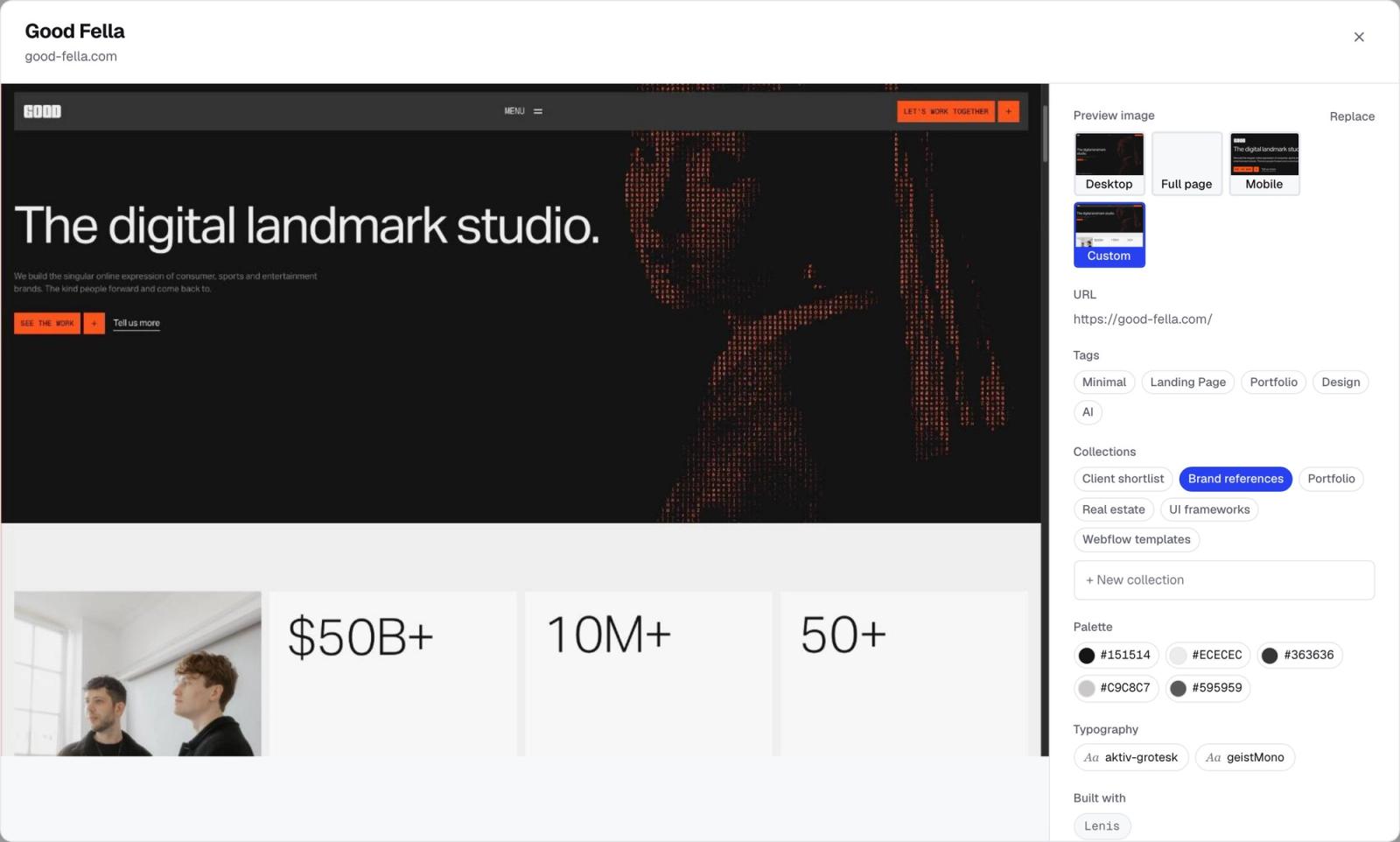
Moodmark's Chrome extension is built around the specific problem this article opened with: you remember a reference by how it looks, not by its title or domain. Saving a site takes one click from the extension, and that single click captures a full screenshot, the color palette actually used on the page, the fonts, and the general tech stack, plus AI-generated tags describing the style and industry.
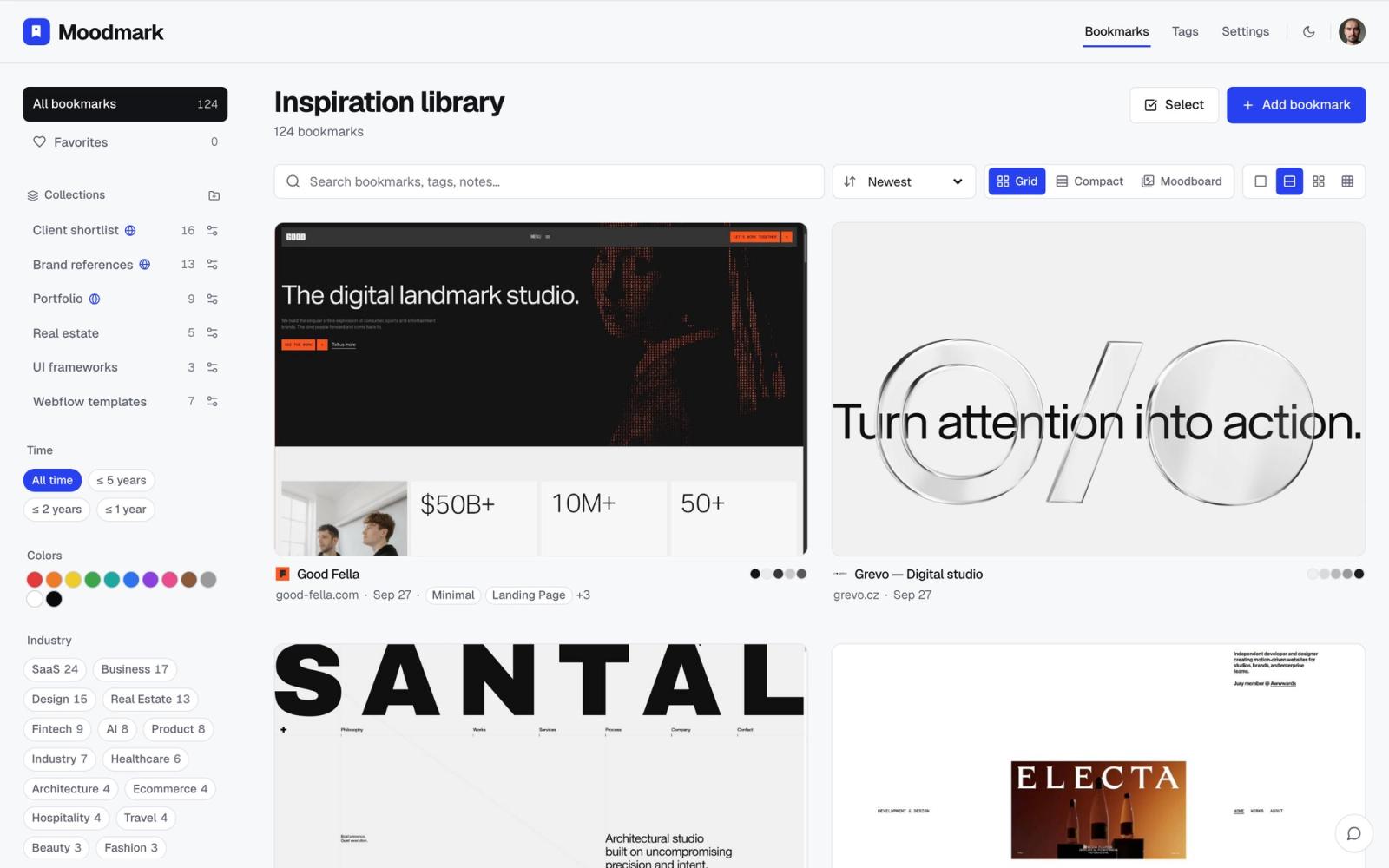
The difference shows up later, not at save time. Instead of scrolling a folder of thumbnails trying to recognize one by shape, you filter your whole library by color, by style, or by industry, the same way you would describe the reference out loud to a coworker. 'The muted green agency site with the big serif headline' becomes an actual filter, not a memory test.
It is worth being upfront that Moodmark is not trying to be a general read-it-later tool or a public inspiration feed. It is built specifically for people who save websites for their design work: designers building a personal reference library, agencies putting together boards to share with clients, and increasingly vibecoders who want to hand a saved reference straight to an AI builder as a starting point, since Moodmark can turn any saved site into a paste-ready build prompt with the extracted colors and fonts included.
How to actually choose
If you mostly save articles and want to read them later without distractions, Pocket is still the right tool for that job. If you want a general-purpose bookmark manager for links across your whole life, not just design, Raindrop covers more ground. If you are already deep into Pinterest boards and mainly want casual browsing and discovery, there is no reason to stop.
But if your actual problem is a growing pile of half-remembered design references you can never find again, none of those tools solve it, because none of them capture the visual details that make a reference recognizable in the first place. That is the specific gap a visual-first extension like Moodmark is built to close: one click to save, and then the ability to search by color, style, and industry instead of by memory.
Building the habit
Whichever tool you pick, the extension only pays off if saving is genuinely faster than not saving. That means installing it, pinning it to your toolbar, and using it the moment you land on something interesting, mid-scroll, rather than telling yourself you will come back and bookmark it properly later. You will not. The sites worth saving are usually the ones you found by accident, and the save has to happen in that same moment or it does not happen at all.
The other half of the habit is trusting your library enough to actually search it before starting new work. A reference library only earns that trust once you have proven to yourself, a few times, that you can find something in it in under ten seconds. Extensions that only save a URL rarely clear that bar. Extensions that save the visual details, the palette, the fonts, the overall look, are what make searching worth doing instead of just starting from a blank page again.
Questions & answers
What is the best browser extension for saving design inspiration?
It depends on what you need afterward. For general reading-later, Pocket works well. For a broad personal bookmark manager, Raindrop.io is solid. If you specifically need to find saved sites again by their look, colors, or fonts, a visual-first tool like Moodmark is built for that, since it captures a screenshot, palette, and fonts automatically on save.
Why isn't Pinterest enough for saving web design references?
Pinterest is good for visual browsing and discovery, but it saves an image, not the live page. You lose the ability to inspect fonts or pull exact colors, and boards are public by default, which is awkward for early client work you are not ready to share.
Can I filter saved websites by color or font?
Only if the tool extracts that data automatically when you save. General bookmark managers store a link and maybe a thumbnail, so filtering by color or font is not possible. Moodmark extracts the palette and fonts at save time specifically so you can filter your library that way later.
