

A saved website reference is useful only if it can become direction. Designers collect landing pages, dashboards, portfolios, product pages, and interaction details because they want to reuse a feeling later: the spacing, the density, the tone, the palette, the typography, the way a hero section introduces an idea. An AI build prompt is the bridge between that visual memory and a tool that needs written instructions.
The mistake is trying to prompt from memory. A sentence like "make a modern SaaS landing page" gives an AI builder almost no design direction. It can produce something, but the result often feels generic because the prompt does not include structure, hierarchy, color roles, component behavior, or visual taste.
What is an AI build prompt?
An AI build prompt is a structured instruction for an AI website builder or coding tool. It describes what should be built and how it should feel visually. A good prompt gives the AI the same kind of direction a designer would give a teammate: page purpose, audience, section order, layout density, palette, typography, components, and reference cues.
For design-heavy work, the prompt should not only describe content. It should describe the design system hiding inside the reference: what color is used for the background, what acts as the accent, how large the display type feels, whether cards are flat or elevated, whether the layout is editorial, grid-heavy, minimal, brutalist, playful, technical, or premium.
Why website inspiration is hard to describe from memory
Most designers do not remember a reference as a URL. They remember it as a mood or a detail: the blue landing page with the dense hero, the brutalist portfolio with huge type, the pricing page with calm spacing, the product grid with soft borders, the AI tool with a great command palette.
Browser bookmarks are weak for this job because they mostly preserve the link. They do not preserve the visual evidence that made the page worth saving. If the title is messy, the page changes, or the bookmark folder grows, the reference becomes hard to find and harder to translate into a useful prompt.
What to capture from a visual reference
Before you write a prompt, capture the reference as a design object. The goal is to keep enough context that you can explain the design later without reopening twenty tabs.
- Screenshot: the visual source of truth for layout, spacing, hierarchy, and mood.
- Source URL: the original page, so you can inspect details or open the live site again.
- Palette: background, surface, text, muted, accent, and border colors.
- Typography: display style, body style, weight, scale, and any detected typefaces.
- Structure: nav, hero, feature blocks, proof, pricing, CTA, footer, or whatever the page actually uses.
- Components: buttons, cards, forms, tabs, grids, modals, command menus, testimonials, or data panels.
- Notes and tags: the reason you saved it and the categories that will help you find it later.
How to convert a screenshot into prompt-ready instructions
Start with a direct description of the page. Then add visual constraints. The more concrete the design direction, the less the AI has to invent.
- Describe the page type. Is it a SaaS landing page, portfolio, dashboard, pricing page, public board, or product detail page?
- List the section structure. Give the AI the order of the page from top to bottom.
- Define the visual mood. Use specific descriptors like editorial, technical, quiet, premium, dense, playful, Swiss, brutalist, cinematic, or minimal.
- Assign color roles. Do not only list hex codes. Say which color is the background, surface, text, muted text, border, and accent.
- Describe typography. Mention display scale, body rhythm, weight, letter spacing, and any typefaces you detected.
- Call out UI patterns. Cards, buttons, inputs, shadows, radius, icons, spacing, and grid density influence the generated design.
- Include implementation tokens. CSS variables or Tailwind theme values make the direction easier to apply.
Weak prompt vs strong prompt
Weak prompts are usually broad. They describe a category, not a direction.
Build a modern landing page for an AI SaaS product.That prompt might produce a page, but it gives the AI no taste. A stronger prompt gives structure and visual constraints:
Design a calm, technical SaaS landing page with a compact top nav, a large two-line hero, a screenshot-led product section, three feature cards, social proof, pricing, and a final CTA. Use a light neutral background, white surfaces, dark text, muted gray supporting copy, and one cobalt accent. Keep the layout spacious but information-dense, with subtle borders, 8px radius cards, minimal shadows, and clear typographic hierarchy. Use CSS variables for background, surface, text, muted, accent, border, and radius.The second prompt is still short, but it gives the builder a design system to follow. It names the structure, tone, layout density, color roles, component style, and token expectations.
How Moodmark creates design.md from a saved reference
Moodmark is built around the capture-to-prompt workflow. You save a website reference as a visual bookmark, then Moodmark keeps the screenshot, URL, metadata, notes, tags, collections, palette, detected fonts, and technology hints together. When you are ready to build, Moodmark can generate a design.md file from that saved reference.
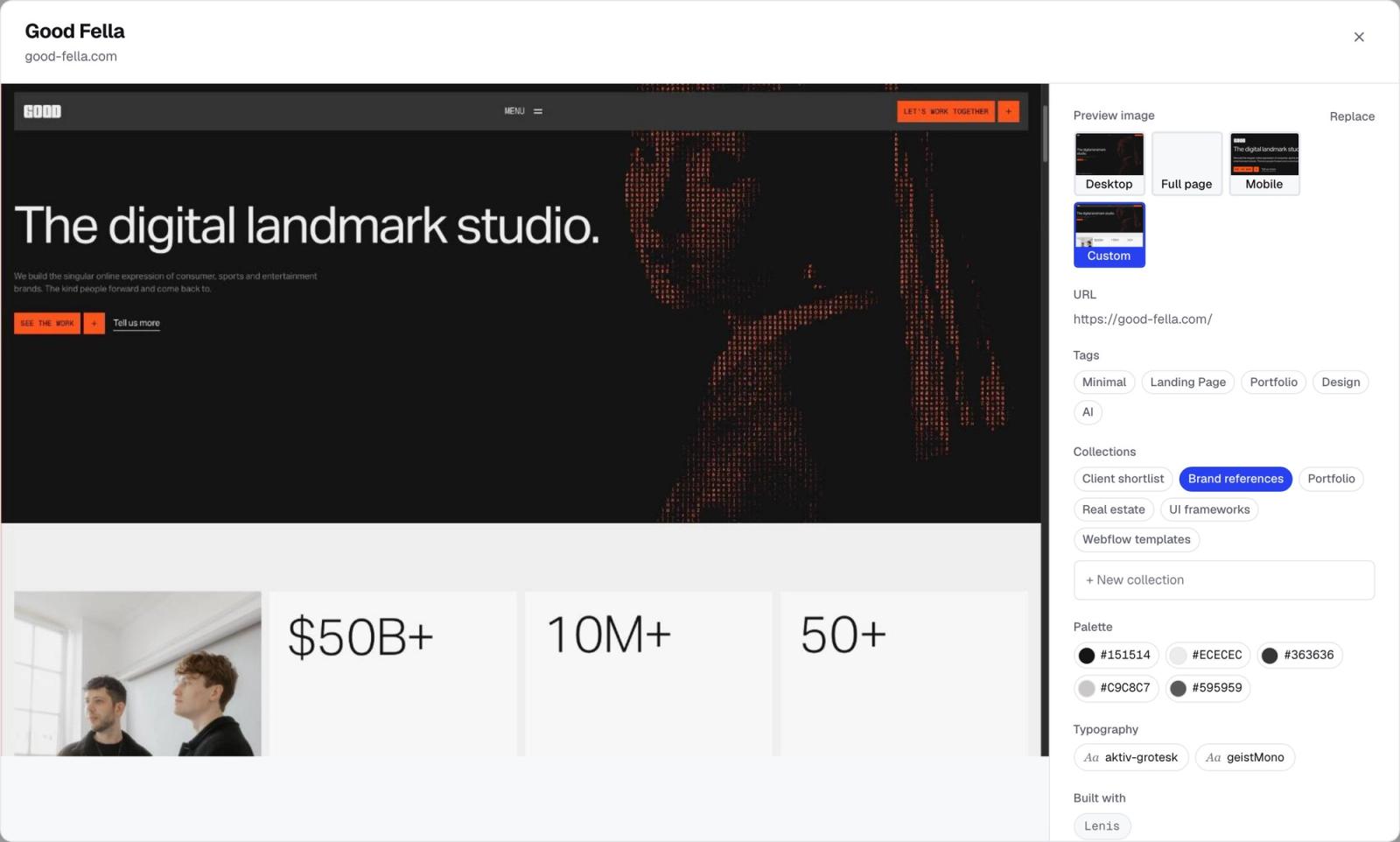
The design.md file is not just a paragraph. It packages the reference into prompt-ready context:
- a ready-to-paste AI build prompt,
- the page structure from top to bottom,
- color roles and palette notes,
- typography direction and detected fonts,
- layout, spacing, component, imagery, and motion notes,
- CSS variables,
- Tailwind token suggestions.
This matters because most AI website builders are only as good as the direction they receive. Moodmark gives you a way to start from real references instead of a vague memory of what looked good.
What Moodmark does not do
Moodmark does not generate the final coded website. It does not clone a site pixel-for-pixel, and it is not a replacement for design judgment. The product creates a better starting point: a visual reference archive and a prompt brief that you can use in an AI builder or coding workflow.
That boundary is useful. It keeps the designer in control of taste, selection, and final direction while removing the most repetitive part of the workflow: translating a visual reference into structured prompt language.
A practical workflow
- Save the website reference while the tab is still open.
- Add a short note about why it matters.
- Let AI suggest useful tags, then keep or adjust them.
- Group the reference into a project or client collection.
- Generate
design.mdwhen you are ready to build. - Paste the prompt into your AI builder and iterate.
The output is not magic. It is organized context. That is what makes it useful.
Questions & answers
What is an AI build prompt?
An AI build prompt is a structured instruction for an AI website or coding tool. A strong prompt includes the page goal, structure, visual style, palette, typography, component notes, and reference direction.
Can you turn a website screenshot into a prompt?
Yes. You can turn a website screenshot into a prompt by describing its structure, layout, colors, typography, components, and visual mood. Moodmark helps by saving the screenshot and generating prompt-ready design context.
What should an AI website builder prompt include?
An AI website builder prompt should include the page purpose, audience, section structure, visual style, palette, typography, components, interaction notes, and any design reference the builder should follow.
Does Moodmark generate the final website?
No. Moodmark generates the design reference and prompt materials. You paste the prompt into an AI builder or coding tool to generate the actual website.
What is design.md in Moodmark?
design.md is a Markdown prompt brief generated from a saved reference. It contains a ready-to-paste prompt, page structure, color roles, typography notes, CSS variables, and Tailwind tokens.
